Understanding Media Source Extensions (MSE) in Modern Browsers (2026 Guide)

Modern video streaming on the web has evolved far beyond simply loading a single video file. Today, platforms deliver adaptive video streams that dynamically adjust quality based on network conditions, device performance, and user behavior.
At the heart of this transformation lies an essential browser technology: Media Source Extensions (MSE).
Without MSE, modern adaptive streaming formats such as HLS (M3U8) and MPEG-DASH (MPD) would not function in most desktop browsers.
But what exactly is MSE?
How does it work?
Why is it critical for adaptive streaming?
And how does it fit into the browser video pipeline?
In this comprehensive guide, we’ll explore:
- What Media Source Extensions are
- Why they were created
- How they work internally
- Their relationship with HTML5 video
- How MSE enables adaptive streaming
- Performance considerations
- Security implications
- Limitations and future developments
What Are Media Source Extensions (MSE)?
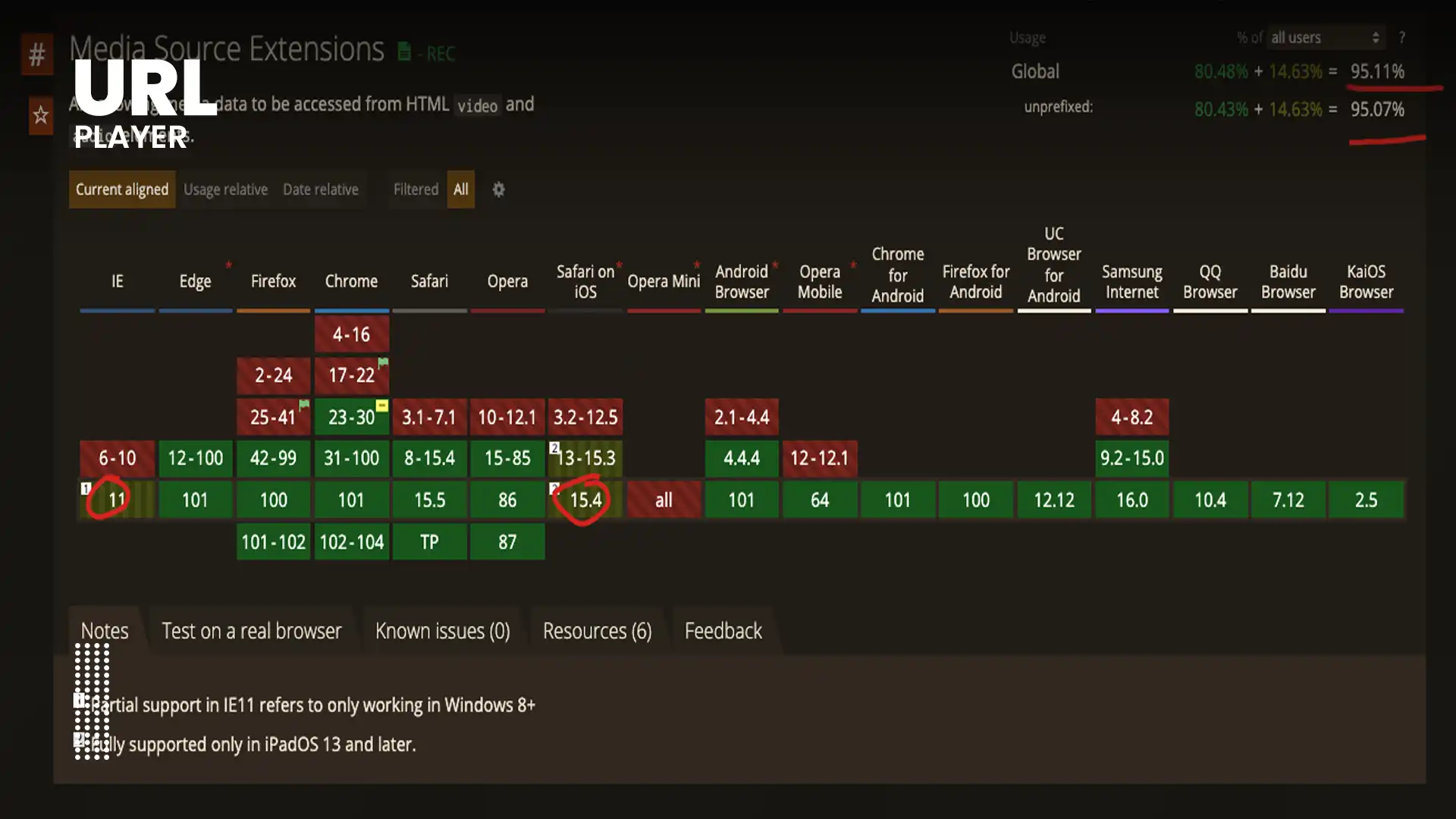
Media Source Extensions (MSE) is a browser API that allows JavaScript to dynamically feed media data into a video element.
In simple terms:
MSE lets developers control how video data is loaded and appended to the browser’s media buffer.
Before MSE, the HTML5 <video> element could only:
- Load a single media file
- Play it sequentially
- Offer minimal control over buffering
MSE changed this by enabling:
- Segment-based streaming
- Adaptive bitrate switching
- Dynamic buffer management
- Live streaming support
MSE acts as a bridge between streaming protocols and the browser’s decoding engine.
Why MSE Was Created?
When HTML5 video was introduced, it supported progressive playback of files like MP4 or WebM.
However, this model had limitations:
- No adaptive bitrate switching
- No dynamic segment loading
- No advanced live streaming
- No custom buffer control
Meanwhile, streaming platforms required:
- Multiple quality levels
- Real-time switching
- Efficient bandwidth use
- Low-latency live streaming
The solution was to create a way for JavaScript to:
- Download small video segments
- Feed them into the browser manually
- Switch between different qualities seamlessly
MSE was standardized to solve this exact problem.
How MSE Works at a High Level?
The process begins when a web application creates a MediaSource object in JavaScript.
The basic workflow is:
- Create a MediaSource object.
- Attach it to a video element.
- Create a SourceBuffer.
- Download video segments.
- Append segments to the buffer.
- The browser decodes and plays them.
This allows full control over:
- Which segments are loaded
- When they are loaded
- What quality they are
- How buffering behaves
The browser still handles decoding and rendering, but JavaScript controls the flow of media data.
The Core Components of MSE
Understanding MSE requires knowing its main components.
1. MediaSource Object
The MediaSource object represents the media stream being constructed dynamically.
It:
- Manages the lifecycle of the stream
- Handles state transitions
- Coordinates buffers
2. SourceBuffer
A SourceBuffer is where media segments are appended.
There can be multiple SourceBuffers:
- One for video
- One for audio
- One for subtitles (if needed)
Each buffer holds compressed media data before decoding.
3. Append Buffer Process
When a segment is downloaded:
- JavaScript appends it to the SourceBuffer
- The browser parses it
- It queues frames for decoding
- Playback continues
This process repeats continuously during streaming.
MSE and Adaptive Streaming
MSE is essential for adaptive bitrate streaming.
Let’s break down how they work together.
Adaptive Streaming Without MSE
Without MSE, a browser would:
- Load a single file
- Play it sequentially
- Have no ability to switch quality mid-playback
Adaptive Streaming With MSE
With MSE:
- The player downloads a manifest file (MPD or M3U8).
- It selects a quality level.
- It downloads small segments of that quality.
- It appends them to the buffer.
- If bandwidth changes, it switches to a different quality.
- New segments are appended seamlessly.
The viewer never notices the switch.
MSE makes this dynamic behavior possible.
MSE and HLS (M3U8)
HLS is natively supported in Safari.
However, in browsers like Chrome and Firefox:
- HLS is implemented using JavaScript libraries.
- These libraries rely on MSE.
- They fetch M3U8 playlists.
- They download TS or fMP4 segments.
- They append segments using MSE.
Without MSE, HLS would not work in most non-Apple browsers.
MSE and MPEG-DASH (MPD)
MPEG-DASH depends heavily on MSE.
The typical workflow:
- Download MPD manifest.
- Parse available representations.
- Choose bitrate.
- Fetch segments.
- Append via MSE.
- Switch representations when needed.
DASH cannot function in browsers without MSE support.
Live Streaming with MSE
Live streaming requires:
- Continuous manifest updates
- Ongoing segment generation
- Dynamic buffer management
MSE allows:
- Removing old segments from buffer
- Appending new segments
- Managing latency
This makes live streaming possible directly in browsers.
Performance Benefits of MSE
MSE improves performance by enabling:
Efficient Bandwidth Usage
Only necessary segments are downloaded.
Faster Startup
Lower bitrate segments can be loaded first.
Buffer Optimization
Player controls how much to preload.
Smooth Quality Switching
Avoids playback interruptions.
Better Mobile Experience
Adaptive behavior prevents excessive buffering.
MSE is a major reason why modern streaming feels seamless.
Buffer Management in MSE
One powerful feature of MSE is buffer control.
The player can:
- Append new segments
- Remove old segments
- Maintain a rolling buffer
- Prevent memory overload
For live streams:
- Older segments are removed.
- New ones are appended.
- Playback continues in real time.
Without proper buffer management, playback could stall or consume excessive memory.
MSE and Browser Decoding Pipeline
After segments are appended:
- The browser demultiplexes the container.
- Video and audio streams are separated.
- Frames are decoded (often via hardware acceleration).
- Frames are rendered to the screen.
MSE does not decode media itself.
It only feeds compressed data to the browser’s native decoding engine.
Security Considerations
MSE runs inside the browser’s sandboxed environment.
Security features include:
- Memory isolation
- Restricted access to file system
- No raw media extraction
- Integration with Encrypted Media Extensions (EME)
When DRM is enabled:
- Segments are encrypted.
- MSE passes encrypted data to the decoder.
- EME handles decryption keys securely.
This prevents unauthorized playback.
Limitations of MSE
Despite its power, MSE has limitations.
1. Codec Compatibility
MSE only works with codecs supported by the browser.
For example:
- H.264 widely supported
- HEVC limited support
- AV1 expanding support
Unsupported codecs will fail.
2. Memory Constraints
Large buffers consume memory.
Improper buffer management can cause:
- Playback crashes
- Performance drops
- Mobile instability
3. Complexity
Using MSE directly is complex.
Most platforms rely on:
- Shaka Player
- hls.js
- Dash.js
These libraries abstract complexity.
MSE vs Progressive MP4
Progressive MP4:
- Single file
- No dynamic quality switching
- Limited buffer control
MSE-based streaming:
- Segment-based
- Adaptive bitrate
- Dynamic control
- Live streaming capability
MSE enables far more advanced functionality.
Real-World Use Cases
MSE powers:
- OTT platforms
- Corporate training portals
- Online education systems
- Sports streaming
- Live events
- Large-scale media publishers
Virtually every major browser-based streaming platform uses MSE.
The Future of MSE
Emerging technologies may complement or extend MSE:
- WebCodecs API
- Low-latency streaming protocols
- WebTransport
- HTTP/3 integration
- Smarter adaptive algorithms
However, MSE will remain foundational for adaptive streaming in browsers.
Why Understanding MSE Matters?
For developers:
- Enables better debugging
- Improves performance tuning
- Optimizes adaptive logic
For content creators:
- Ensures smooth playback
- Reduces buffering complaints
- Improves engagement metrics
For businesses:
- Increases retention
- Boosts conversion rates
- Enhances user satisfaction
MSE is not just a technical feature — it directly impacts user experience.
Conclusion
Media Source Extensions (MSE) is a critical technology that powers modern web-based adaptive streaming. By allowing JavaScript to dynamically append video segments into the browser’s media buffer, MSE enables adaptive bitrate switching, efficient bandwidth usage, and seamless live streaming.
Without MSE, protocols like HLS and MPEG-DASH would not function effectively in most browsers.
As streaming continues evolving in 2026 and beyond, MSE remains a cornerstone of the HTML5 video ecosystem, enabling faster, smarter, and more resilient video playback experiences across devices and networks.
Understanding MSE is essential for anyone building or optimizing modern video platforms.