
URL Video Player Online
Play your favorite videos in (M3U8, MP4, DASH, Embed) formats using our video player for the best mobile experience.
Don’t you get frustrated when you have to download bulky video apps or install a complex software just to test a link?
Let me introduce to you URL Player Online, a fast, lightweight and completely browser-based video player which works instantly on any device.
If you are merely testing an MP4, streaming an M3U8 HLS link, loading a DASH (.mpd) source, or previewing a YouTube, Vimeo, or any embed URL, our player is your go-to tool to smoothly handle everything without any app installs, setups, or limitations.
URL Player Online is like a magic wand for developers, streamers, creators, and the general population. Just one click and any valid video URL is transformed into neat, high-quality playback.
In contrast to mobile apps that require downloads or permissions, our player is fully online and thus, you get a quicker, neater, and more versatile experience on desktop, mobile, and smart devices.
Just put your link → hit Play → and get instant playback in your browser. Easy.
The videos that you have are worthy of a player that simply works anywhere, anytime.
What Is URL Player Online?
The URL Player Online is an easy-to-use but powerful online video player that allows you to simply copy/paste any video link into the text box on our website to instantly stream the video in your web browser. No matter if the video is hosted on our website, CDN’s or Cloud Drives, or streamed from a remote server; You do not have to download anything (no apps or extensions).
As a universal video player, URL Player Online supports all formats as link video players. It can play MP4 files, create M3U8 HLS Streams, and create Diverse (.mpd) sources. In addition, we accept all types of embed URLs including popular streaming platforms such as YouTube and Vimeo. If you’re looking for a reliable way to stream video from a link to your computer, convincing URL Player Online is the tool that will allow you to virtually stream without a problem within seconds.
The URL Player Online works directly in your internet browser and has been designed to run on a laptop or mobile phone; tablet, or your Smart TV – no downloads and no installation necessary – just visit us in your favourite browser with an internet connection that is stable and reliable.
As such, it’s the quickest; The easiest and The most flexible tool for playing back videos:
Key Features :
Play Online Videos From Any URL – Instantly and Without Software
Instead of downloading apps or setting up a media player, you can simply open any video URL directly on your browser using URL Player Online. This means that you won’t have to waste any time installing or configuring anything before getting started.
URL Player Online offers smooth and clean playback, thanks to features like full-screen mode and Picture-in-Picture (floating window). You’ll also have a responsive experience on all devices. This is the best way to view online video content without the need for additional software or heavy desktop applications such as VLC.
So whether you want to test out a stream, check out a video link or watch something while you’re on the move – URL Player Online provides you with the quickest, lightest and most modern way to view online videos directly from the URL, anytime, anywhere.
Play Anything, Anywhere!
Your videos deserve a player that just works.
URL Player Online turns any valid video link into smooth playback — no downloads, no codecs, no stress.
Copy Your M3U8 Link
Paste a link → click Play → enjoy your stream.
Paste the URL
Test live streams, preview embeds, or play hosted files.
Click Play
Works perfectly on Chrome, Firefox, Safari, and mobile.
Whether you’re a developer, streaming enthusiast, or creator, this is your one-stop video tool.
Why Choose Our Free Video Player Online?
Unlike traditional apps or heavy desktop software, URL Player Online loads instantly and works everywhere. It’s ideal for developers testing video URLs, streamers checking live feeds, creators previewing embeds, and anyone who needs a quick way to open video links online.
Completes Each Primary Format
Play MP4 files, HLS (M3U8) streams, DASH (.mpd) source files and all types of embed URLs. You can watch anything that has an associated link.
Immediate, Smooth Video Playback
No installing, no plugins, and no waiting for your video to load. Just drop or paste a link in and watch your video play back as soon as you paste it in – including when using live M3U8 streams.
Fully Secure and Encrypted Video Playback
Video links and streams are delivered securely via HTTPS, meaning that your links and streams are 100% safe, private and encrypted during the entire playback process.
Fully Responsive to All Devices
Fully responsive video player that works flawlessly on desccretion, laptop computers, tablets, smart phones, as well as all smart televisions. Automatic video adaption to the proper screen size.
Ideal for Streaming Creators and Developers
Test M3U8 links, validate live streaming links, preview embed URL links and trouble-shoot sources of videos in five easy steps. Very powerful resource for streaming platform providers and developers. The best part it is free.
Clean, Ad-Free Viewing
It is frustrating to watch videos with popup ads as well as get interrupted by other advertisements while watching videos.

How It Works?
URL Player Online has been built with a focus on being fast, simple, and hassle-free for everyone. The process is broken down into 3 easy steps:
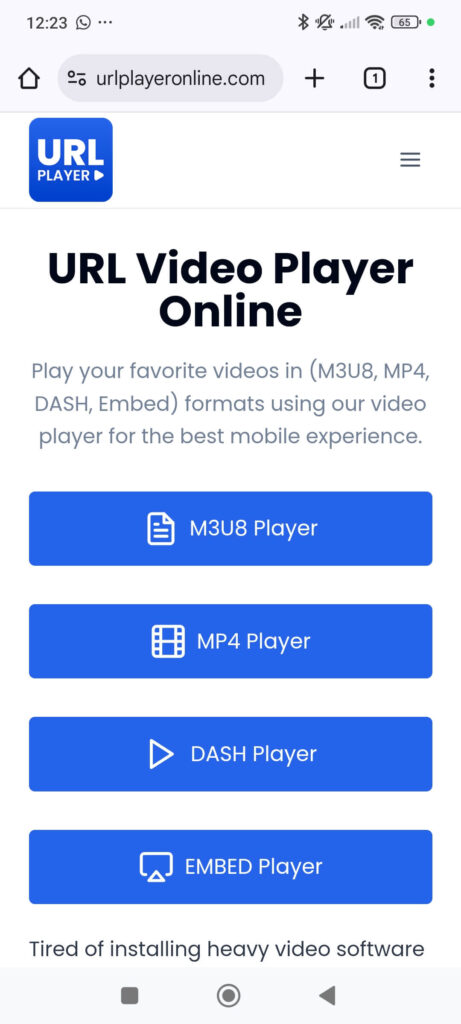
1 – Select Your Player Type
- Choose the type of player you’re going to use to view your video.
- The online video player will work with any of the major video link types.
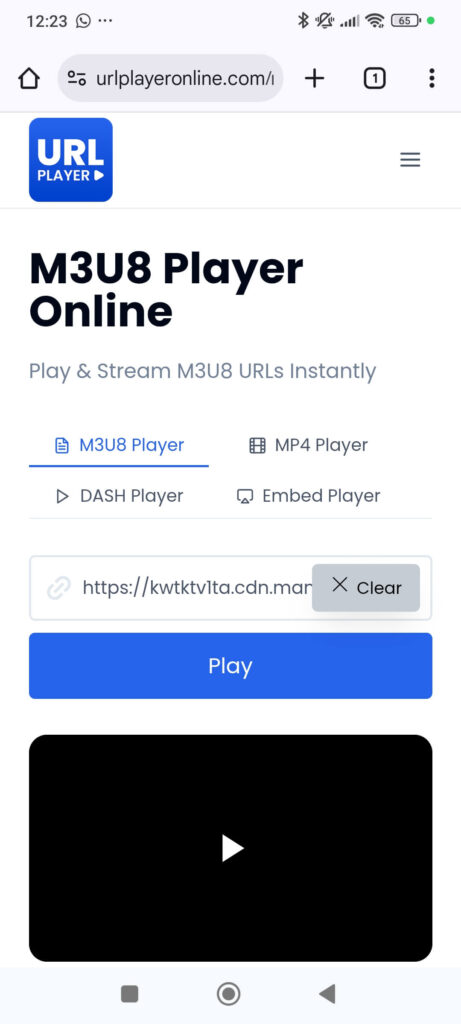
2 – Paste Your Video URL
- Input your video URL, regardless of whether it is from YouTube, Vimeo, Direct MP4, an HLS (.m3u8) stream, or DASH (.mpd) source. URL Player Online will work with almost any type of link.
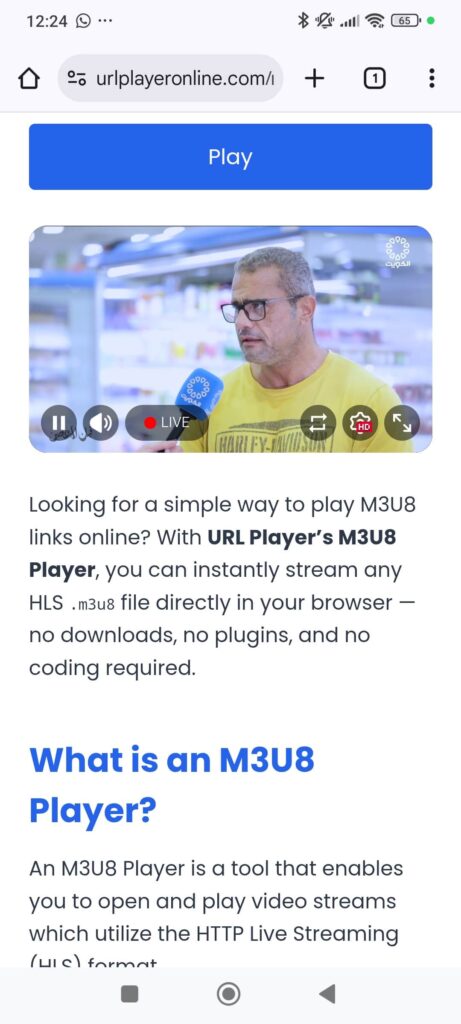
3 – Click Play
- Press Play and your video will start to play immediately in your browser.
- This means there is no need for you to do any downloads, use plugins, or write code — just straight clean HD viewing.
That’s all there is to it! Fast, Simple, and 100% web-based.
Test out, Preview, and view any video at a link in seconds on any device with URL Player Online.
Powerful Tools Inside URL Video Stream Player Online
|
Tool |
Purpose |
Supported Links |
|---|---|---|
|
M3U8 Player |
Stream and test HLS |
HLS Live & VOD |
|
MP4 Player |
Play MP4 videos instantly online. |
Direct MP4 URLs |
|
DASH Player |
Stream MPEG-DASH |
Adaptive DASH links |
|
Embed Player |
HTTPS Embed URLs |
Each player is built for speed, simplicity, and cross-platform compatibility all under one clean design.
Link Video Player – Latest Updates and Improvements
URL Player On-line strives to provide an exceptional video watching experience through providing all of its users Prompt, Clean, and Dependable Video Playback. Our progressive evolution features ongoing improvements to performance, access and streaming capacity.
Next charts our newest installment of Version 4.0! It provides major advances in the URL Player On-line video player Framework and enhances the user’s experience while utilizing the player.
Pivotal items included with this Release, include:
Playback Performance:
We improved our internal streaming system to provide a smoother and more stable video playing experience on all supported formats. You will find that videos now load faster and can handle any possible fluctuations in your internet connection.
Keyboard Controls:
Instantaneously control playback through keyboard shortcuts:
- Spacebar: Play/Pause
- Arrow Keys: Seek forward or backward
- “+” or “–”: Speed up your playback rate
Having these keyboard shortcuts makes URL Player Online even more efficient for users who utilize our product heavily, along with testers and developers.
Picture in Picture Enhancement:
Our enhanced Picture in Picture feature now provides a more stable floating window experience. You will be able to continue watching your video while performing other tasks (such as using your other tabs or applications) without losing your video view.
Mobile Viewing Optimizations:
We incorporated numerous mobile-focused enhancements including:
- Faster loading times
- Enhanced touch controls
- Better full screen video handling
- Greater responsive layout across all screen sizes
These enhancements will ensure a seamless and clean playback experience from virtually any mobile device.
Subtitle Support:
Now users can load their subtitle tracks in all supported video sources and benefit from greater flexibility and accessibility when choosing to watch videos.
YouTube/Vimeo Embed Support:
By downloading and testing out YouTube and Vimeo links directly in the player interface, URL Player Online is now an excellent option for creators and developers wanting to preview and try out their embed URLs quickly.


Troubleshooting Made Easy
If you are having difficulty loading or playing a video URL, the following quick checks can solve most issues very quickly.
- Ensure the link you are using is a valid URL, publicly accessible, and non-restricted; video URLs that are private or restricted will not load in a browser-based video player.
- If the video is not starting, try refreshing your browser and re-pasting the link; in many cases, a simple reload can restore lost configurations in your browser’s cache, or correct potential networking interruptions that may be interfering with playback.
- Always ensure that the source link for your video starts with “https://”, as today’s browsers require “secure” links in order to stream media securely and reliably.
- Some videos may not be available due to geographic block, privacy settings, or restrictions imposed at the level of the video hosting platform (YouTube, Vimeo, Dailymotion, etc.). If you believe that a video you are trying to watch is geo-blocked, restricted, or simply not meant for direct playback, you may be unable to load that video through the player.
- If a video hosting platform prohibits direct streaming (e.g. YouTube, Vimeo, Dailymotion, etc.), simply switch to our Embed Player. Our Embed Player uses the video hosting platform’s own embed technology and can play videos directly from within the Embed Player in a verified and secure environment, even if the direct file cannot be accessed via the player.
By following these steps, you can resolve most playback issues quickly and ensure a smooth, uninterrupted viewing experience on URL Player Online.
Advantages of Using URL Player Online
Several online video players assert that they have the ability to stream videos using direct links; however, most of them contain one or more of these limitations: a lot of advertisements, popup windows, seats for registration, slow streaming speed, and/or limited file formats. URL Player Online was designed specifically to address these issues by providing a concise, fast, and entirely browser-based manner of streaming any video streamable via direct URL links.
The following summarizes some key benefits of selecting URL Player Online as your primary video player for all of your link-based video requirements.
No Downloads, No Storage Usage
Instead of downloading large video files, you can stream them instantly. This saves space on your device and keeps your system safe from potentially harmful downloads.
Fast, Smooth Playback
URL Player Online loads video links quickly, providing a seamless playback experience without long wait times. Once the stream begins, your video plays smoothly just like a local file without unnecessary buffering.
Safe and Secure Streaming
Because everything runs in your browser over a secure HTTPS connection, you avoid the risks associated with downloading unknown files. Your video URLs are not stored, tracked, or shared, ensuring a safe and private viewing experience.
Works on Any Device
Whether you’re using a desktop, laptop, phone, tablet, or smart TV, URL Player Online works instantly, no software installation, plugins, or apps required. If your device has a browser, the player works.
Multi-Format Support
You can open a wide range of video URLs, stream sources, and embed links without dealing with compatibility issues.
URL Player Online supports:
- Direct video links
- Streaming URLs
- YouTube and Vimeo embeds
- Browser-supported video formats
This makes it a simple, universal solution for playing videos from any link.
High-Quality Playback With No Compression
Videos play at their original quality. Because we don’t re-encode or modify your stream, you get full-resolution playback exactly as the source delivers it.
Full Playback Control
You maintain complete control over your viewing experience:
- Volume adjustment
- Playback speed control
- Forward and backward seeking
- Full-screen mode
- Picture-in-Picture mode
- Responsive player scaling
These tools make URL Player Online ideal for both quick previews and extended viewing sessions.
Clean, Ad-Free Experience
Unlike many online tools, URL Player Online does not interrupt your viewing with pop-ups, ads, or unnecessary distractions. The player is designed for clear, focused playback.
What’s Coming Next?
We are already working on the next major update, which will introduce:
Our goal is to deliver the most reliable, secure, and user-friendly online video player on the web.
Pros & Cons
Pros
Cons
Conclusion
URL Player Online is redefining how you play and test video URLs. It’s not just a viewer it’s your universal video stream player for the modern web, built for creators, streamers, and developers who value speed and simplicity.
Whether you’re watching, embedding, or testing, URL Player brings everything together instantly, securely, and beautifully.
Try it now paste a link, click play, and experience the future of online video playback.
FAQ
How do I play a video link online?
Simply copy any video URL, paste it into the player box on our website, and click Play. The video will start instantly in your browser, whether it’s MP4, M3U8, or DASH format.
Is URL Player Online free to use?
Yes, the player is 100% free, secure, and ad-free. You can stream videos directly without registration or installation.
What types of video formats does URL Player Online support?
Our platform supports MP4, M3U8 (HLS), MPEG-DASH (.mpd), and embedded video URLs from YouTube, Vimeo, and Dailymotion all playable instantly in your browser.
Can I use URL Player Online on mobile devices?
Absolutely. The player is fully responsive and optimized for desktop, tablet, and mobile browsers, giving you smooth playback everywhere.
Are my video links safe when using this tool?
Yes. All playback runs through secure HTTPS connections. Your URLs are not stored or shared — playback happens directly between your browser and the video source.
What should I do if my video doesn’t load?
Make sure the video link is active and publicly accessible. If the stream still doesn’t work, refresh the page or try another browser. Some private or region-restricted streams may not be playable.
Do you support live streams?
Yes! The player fully supports live streaming via M3U8 (HLS) and DASH formats. Just paste your live stream link and click Play.