How to Prevent Video Hotlinking on Your Website?

Video content is one of the most powerful assets on modern websites. Whether you publish marketing videos, online courses, premium content, or live streams, video often represents significant investment in production, hosting, and bandwidth.
However, many website owners overlook a serious problem: video hotlinking.
Hotlinking occurs when another website directly embeds or references your video file or stream without permission. This can lead to:
- Increased bandwidth costs
- Slower performance
- Lost revenue
- Unauthorized content distribution
- Security risks
In this comprehensive guide, we’ll explain:
- What video hotlinking is
- Why it’s a problem
- How hotlinking works technically
- Methods to prevent it
- Best security practices
- CDN-level protections
- Advanced streaming safeguards
If you host video content, this guide will help you protect it properly.
What Is Video Hotlinking?
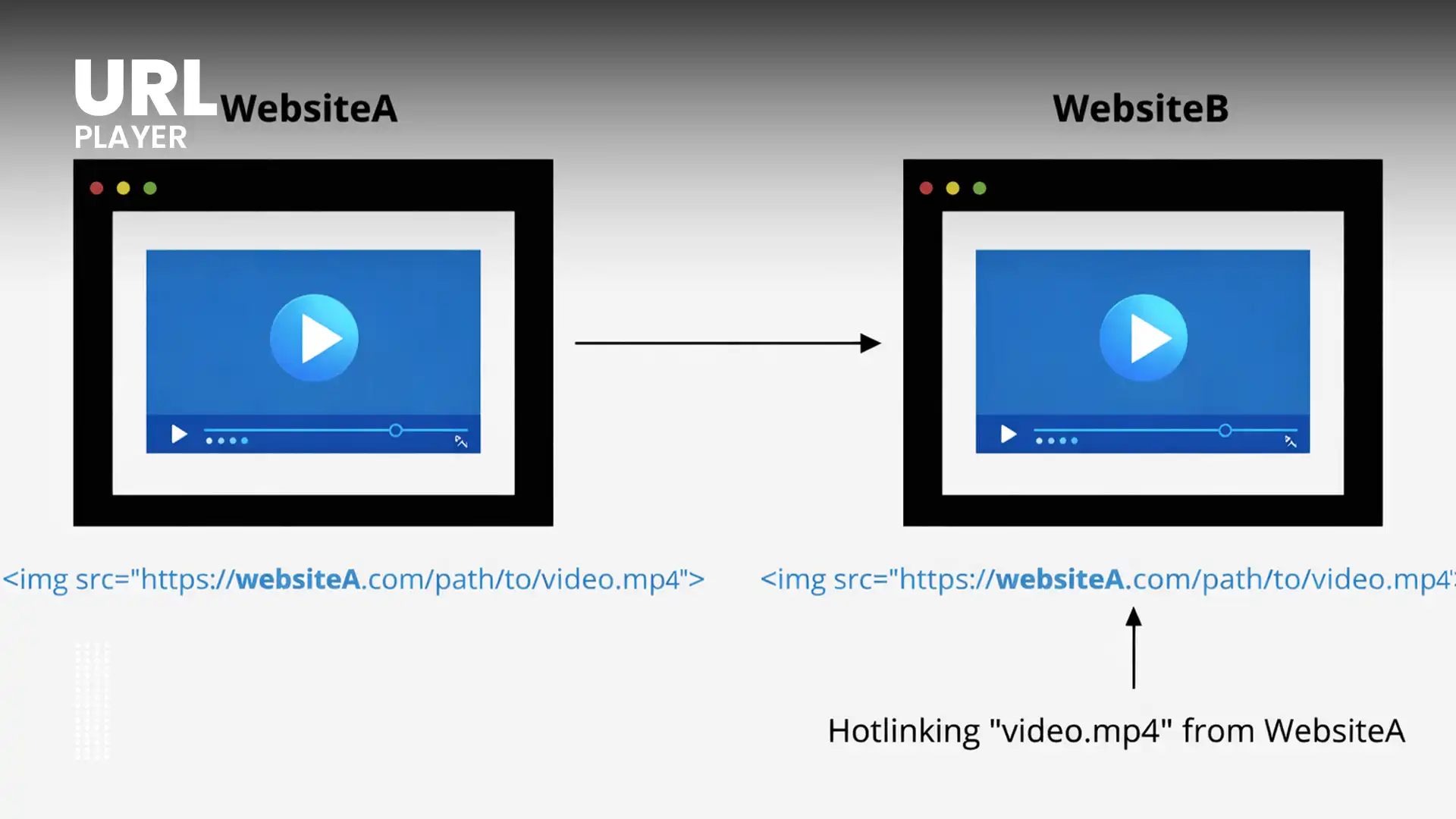
Video hotlinking happens when someone embeds your video file or stream URL directly on their website.
Instead of uploading the video themselves, they simply reference your file, like this:
<video src="https://yourdomain.com/video.mp4" controls></video>
When visitors load their page:
- The video is delivered from your server
- Your bandwidth is consumed
- You receive no credit or benefit
This is sometimes called:
- Bandwidth theft
- Content leeching
- Media embedding abuse
Why Video Hotlinking Is a Serious Problem?

Many assume hotlinking is harmless. It isn’t.
1. Bandwidth Costs
Video files are large.
If another site embeds your content:
- Every viewer uses your server resources
- Your hosting bill increases
- Performance may degrade
For streaming platforms, this can become expensive quickly.
2. Server Performance Degradation
Uncontrolled traffic from external sites may:
- Overload your server
- Increase latency
- Cause buffering
- Slow down legitimate users
3. Revenue Loss
If your videos include:
- Ads
- Subscriptions
- Lead capture
- Branding
Hotlinking can bypass monetization or misrepresent your brand.
4. Security Risks
Exposed video URLs can lead to:
- Content scraping
- Redistribution
- Piracy
- Unauthorized downloads
Preventing hotlinking is a critical part of content protection.
How Video Hotlinking Works (Technical Perspective)?
Hotlinking typically occurs when:
- Someone inspects your website.
- They find the direct video URL.
- They copy the file path.
- They embed it on their site.
This is possible when:
- Video files are publicly accessible.
- No authentication is required.
- No domain restrictions are configured.
If your video is accessible via a direct URL, it can be referenced anywhere.
Methods to Prevent Video Hotlinking
Now let’s explore practical solutions.
1. Use Referrer-Based Protection (.htaccess Method)
If you use Apache servers, you can restrict access based on HTTP referrer headers.
Example configuration:
RewriteEngine On
RewriteCond %{HTTP_REFERER} !^https://(www\.)?yourdomain\.com/ [NC]
RewriteRule \.(mp4|m3u8|mpd)$ - [F]
This blocks requests not coming from your domain.
Pros:
- Easy to implement
- Effective for basic protection
Cons:
- Referrer headers can be spoofed
- Not ideal for advanced security
2. Nginx Configuration Blocking
For Nginx servers:
valid_referers none blocked yourdomain.com *.yourdomain.com;
if ($invalid_referer) {
    return 403;
}
This denies unauthorized embedding.
3. Disable Directory Listing
Ensure directory browsing is disabled.
If users can browse your media directory, it’s easier to copy URLs.
4. Use Signed URLs (Token-Based Authentication)
One of the most effective solutions is token-based authentication.
How it works:
- Video URLs contain time-limited tokens.
- Tokens expire after a short period.
- Shared links stop working.
Example:
https://cdn.yoursite.com/video.m3u8?token=abc123&expires=1700000000
Advantages:
- Prevents permanent link sharing
- Works with CDNs
- Strong protection for streaming
Best for:
- Premium content
- Subscription platforms
- Paid video courses
5. Implement CDN-Level Protection
Most CDNs support:
- Signed URLs
- Signed cookies
- Token validation
- Referrer filtering
- Geo restrictions
Benefits:
- Offloads validation from origin server
- Scales globally
- Provides advanced logging
CDN protection is highly recommended for professional websites.
6. Enable DRM for Premium Streaming
If you deliver premium content using:
- HLS
- MPEG-DASH
You can integrate:
- Widevine
- PlayReady
- FairPlay
DRM encrypts content so that even if files are accessed, they cannot be played without a valid license.
This is stronger than simple hotlink blocking.
7. Use CORS Restrictions
Cross-Origin Resource Sharing (CORS) can restrict which domains are allowed to access your media files.
Example header:
Access-Control-Allow-Origin: https://yourdomain.com
This prevents other domains from embedding your media.
8. Use Streaming Instead of Progressive MP4
Direct MP4 files are easier to hotlink.
Adaptive streaming formats (HLS, DASH):
- Use segmented delivery
- Hide full file path
- Allow token protection per segment
Streaming is safer than progressive download.
9. Obfuscate Video URLs
While not a primary security method, obfuscation:
- Makes URLs harder to guess
- Adds basic deterrence
But never rely on obfuscation alone.
10. Use Watermarking
If you suspect redistribution:
- Visible watermarks discourage misuse
- Forensic watermarking helps trace leaks
This doesn’t stop hotlinking, but discourages piracy.
Best Security Layering Strategy
For strong protection, combine:
- HTTPS encryption
- Signed URLs
- CDN validation
- Referrer restrictions
- Short token expiration
- DRM for premium content
Layered security is always stronger than a single method.
Common Mistakes to Avoid
- Leaving MP4 files publicly accessible
- Using long-lived signed URLs
- Ignoring CDN security features
- Forgetting to protect manifest files (.m3u8, .mpd)
- Relying only on referrer blocking
- Not monitoring unusual traffic
Security requires monitoring and maintenance.
How to Detect Video Hotlinking?
Watch for:
- Unusual traffic spikes
- Traffic from unknown domains
- Increased bandwidth usage
- High video requests without corresponding page views
Use:
- Server logs
- CDN analytics
- Security monitoring tools
Early detection prevents financial damage.
Legal Considerations
In cases of unauthorized embedding:
- Send a takedown notice
- Contact hosting provider
- File DMCA complaint (if applicable)
However, technical prevention is more effective than legal action.
Future Trends in Hotlink Prevention
In 2026 and beyond, protection is evolving with:
- AI-based anomaly detection
- Device fingerprint binding
- Zero-trust streaming architectures
- Real-time token validation
- Edge computing enforcement
As video traffic grows, protection technologies continue improving.
Conclusion
Video hotlinking can significantly impact bandwidth costs, server performance, revenue, and content security. While basic referrer blocking provides minimal protection, modern websites should implement stronger safeguards such as signed URLs, CDN validation, token-based authentication, and DRM for premium content.
The best approach is layered security: combining multiple protective mechanisms ensures your video assets remain under your control.
By implementing proper hotlink prevention strategies, you protect not only your infrastructure and costs but also your intellectual property and business model.